
Reliable internet has officially become the “fourth utility” for the modern RVer, standing right alongside water, electricity, and sewer as a baseline requirement for a successful trip. The days of relying on unpredictable campground WiFi are largely over; today’s travelers are responsible for bringing their own “office on wheels” with them.
This evolution is driven by more than just the desire for evening entertainment. It is about the freedom to navigate complex routes, manage financial security, and maintain vital connections with family while exploring remote areas. For the growing number of people working from the road, a dropped connection isn’t just an inconvenience—it is a disruption to their livelihood. This is why having reliable RV Internet is important.
Staying connected while mobile requires a fundamental shift in how you think about networking. You are moving away from the legacy mindset of simply “joining a signal” and toward building a private, multi-source system that provides the same stability you expect at home. This means taking ownership of your own hardware rather than being at the mercy of whatever infrastructure a park provides.
By viewing internet as a dedicated system, you transform your rig into a self-contained hub. This professional approach allows you to visit locations that were previously considered “dead zones” while maintaining high-speed data. It ensures that your internal network remains secure and consistent, regardless of how many other campers are competing for the local airspace.
How RV Internet Systems Work (The Big Picture)
An RV internet system is designed to provide a stable, private network for all your devices regardless of where you are parked. Unlike a home network that relies on a single fixed cable line, an RV system is dynamic and mobile. It typically centers around a specialized mobile router that acts as the “brain” of your rig’s connectivity.
This router can pull in signals from various external sources—satellite, cellular towers, or local park WiFi—and rebroadcasts them inside your coach. This “closed-loop” approach is the foundation of a professional setup. It creates a private, permanent network that travels with you from state to state.
By connecting your laptops, smart TVs, and phones to one internal router, you never have to reconfigure your devices when you move. You simply point your router to the best available outside source, and every device in your RV stays online automatically. This saves the frustration of manually connecting ten different gadgets to a new password every few days.
This setup also provides a critical layer of digital security. It keeps your personal data off of public, unencrypted campground networks where security breaches are a common risk. By controlling your own hardware, you ensure that your work calls and bank logins stay behind a private firewall, giving you peace of mind in crowded parks.
Satellite Internet: The Sky-View Standard
Satellite internet has fundamentally changed mobile travel by providing high-speed data in remote areas where cell towers simply do not reach. Unlike older satellite technology that suffered from high latency, modern low-earth orbit (LEO) systems use a network of thousands of satellites circling much closer to the planet.
This proximity allows for a much faster response time. It makes tasks like video conferencing, online gaming, and large file uploads possible from almost any location with a clear path to the sky. For the modern RVer, this tech has turned previously “dead” campsites into fully functional remote offices.
The hardware for these systems has evolved to meet the specific needs of the mobile community. You can now choose between permanent roof-mounted options and highly portable, compact units. Many travelers prefer the smaller terminals due to their low power draw and ease of storage.
These compact units often feature built-in networking hardware, allowing them to run directly off an RV’s DC power system. This efficiency is a major advantage for boondockers who need to conserve every amp-hour in their battery bank while staying connected in the deep wilderness.
One of the most significant recent advancements is how modern hardware handles physical obstructions. In the past, a single tree branch could completely interrupt your connection. This made satellite nearly useless in heavily wooded campgrounds or national forests.
Current systems now use proactive algorithms that can predict when a satellite is about to pass behind an object. The hardware can seamlessly switch to a different satellite in a clear part of the sky before a dropout occurs. This significantly increases reliability for those who prefer shaded campsites.
Despite these technological leaps, the requirement for a clear “sky-view” remains the primary limiting factor. While the newer software is much more forgiving of partial cover, a dense canopy of old-growth trees will still result in degraded performance or intermittent outages.
This is why full-time travelers and remote professionals rarely rely on satellite as their only source of internet. They understand that while satellite offers unmatched reach, it works best when paired with a cellular-based backup for those times when the geography of a campsite is less than ideal.

Cellular Data: Modern Gateways and Signal Penetration
While satellite is a game-changer for remote areas, cellular data remains the most versatile way to stay connected in developed regions. However, there is a massive performance gap between using a smartphone as a hotspot and a dedicated mobile gateway.
While a phone is optimized for handheld use and voice calls, a dedicated gateway is built for high-capacity data. These units feature better heat management and processors designed for 24/7 operation. This makes them far more reliable for long workdays or streaming marathons.
One of the biggest hurdles in an RV is the “Faraday cage” effect. The aluminum or fiberglass skin of an RV acts as a shield that reflects cellular signals away from the interior. This often explains why you might have a great signal outside but almost no connection once you step inside.
A dedicated system solves this problem by using external antennas. These are mounted on the roof to “grab” the signal from the outside and bring it directly into the router via shielded cables. By bypassing the RV’s walls, you ensure your devices receive the cleanest and fastest signal possible.
For the weekend traveler, a high-quality mobile hotspot may be sufficient if parked in areas with strong tower density. However, full-timers and those traveling to more rural state parks will find that the antenna-to-gateway connection is what makes their internet usable at the “fringe” of a cell tower’s reach.
Modern cellular systems also utilize 4×4 MIMO technology to maintain high speeds. This allows the router to send and receive data across four separate paths simultaneously. It is effectively like adding more lanes to a highway, ensuring your 4K stream or video call doesn’t stutter when the network gets busy.
Antennas and Signal Optimization
To maximize a cellular connection, you must choose between a signal booster and an external antenna system. While they sound similar, they function very differently. A signal booster acts like a megaphone; it takes a weak, existing signal and amplifies it so your devices can “hear” it better.
This is excellent for basic texting or voice calls in fringe areas where you have almost no service. However, boosters are often limited in their data speed because they don’t support modern multi-path technologies. They are a “last resort” tool for staying in touch, rather than a primary tool for high-speed work.
For high-speed streaming and remote work, an external MIMO antenna is the professional choice. This technology uses multiple separate paths to send and receive data simultaneously. Think of it as adding four or five more lanes to your digital highway, allowing data to flow in both directions without causing a bottleneck.
By mounting a high-gain antenna on the roof of the RV and connecting it to a compatible router, you ensure the system has the cleanest, fastest path to the tower. This setup is the gold standard for maintaining the high-bandwidth connection required for modern video conferencing and 4K streaming.
External antennas also provide the benefit of height. By getting your antenna 10 to 12 feet off the ground, you can often “see” over the tops of other RVs and obstacles that would otherwise block a signal at ground level. This elevation is often the deciding factor in whether you have usable internet or none at all.
Connectivity Solutions for Every Type of RVer (Full-timers, Weekend Warriors, etc.)
The right setup depends entirely on your travel style and how much you rely on the internet for your daily life. A weekend traveler who only needs to check the weather and send a few emails has very different requirements than a full-time family or a remote professional. By identifying your specific travel profile, you can avoid overspending on hardware you don’t need or, conversely, suffering from a system that can’t keep up.
The Weekend Warrior If you primarily visit developed campgrounds near highways or towns, a high-quality cellular system is often all you need. These users rarely require the high upfront cost and power draw of a satellite system because cellular towers are usually abundant in these locations. A modern 5G mobile hotspot or a simple cellular router provides plenty of speed for evening streaming and light browsing.
The Full-Time Professional For those working forty hours a week from the road, redundancy is mandatory. This traveler typically uses a “hybrid” setup consisting of both satellite and a dedicated cellular router. This allows for a feature called “failover,” where the router automatically switches to cellular if the satellite is blocked by trees or heavy weather. This ensures that a work meeting or an important call is never interrupted by a passing cloud.
The Off-Grid Boondocker Off-grid enthusiasts face the additional challenge of power management. Satellite is often the only way to get a signal on remote public lands, but it pulls a significant amount of power from the RV’s battery bank. These users often look for specialized conversion kits that allow them to run their hardware directly off the house batteries. This avoids the energy loss associated with running a large power inverter.
The Seasonal Park Traveler Those who spend months at a single established park often face the challenge of “crowded airspace.” Even if a park offers free WiFi, the signal may be too weak to reach the inside of your rig. These travelers benefit most from a “WiFi repeating” system. This setup uses a roof antenna to pull in the park’s signal, cleans it up, and rebroadcasts a strong, private signal throughout the RV interior.
Managing Data Caps and Network Congestion
Even with the best hardware, your experience will be dictated by your data plan and the local network environment. Cellular carriers often “throttle” or slow down your connection after you reach a certain amount of data usage each month.
Understanding the difference between “Priority Data” and “Deprioritized Data” is essential for anyone who streams video or works with large files. Priority data ensures your speeds stay high even when the tower is busy, while deprioritized data can crawl during peak hours.
Network congestion is a reality of the mobile lifestyle, especially in popular destinations. In a crowded RV park during peak season, hundreds of people may be trying to use the same local cell tower at once.
A high-quality mobile gateway can help mitigate this by “locking” onto less-congested frequency bands that a standard smartphone might ignore. Being able to pivot between different carriers or switch to satellite during these peak hours is the only way to ensure a consistent experience.
For those traveling in 2026, many “unlimited” plans still have hidden “high-speed” limits. Always check the fine print for the Fair Usage Policy. Knowing exactly when your speeds might drop allows you to plan your data-heavy tasks, like system updates or movie downloads, for when you have the strongest connection.
The Importance of Hardware Placement and Installation
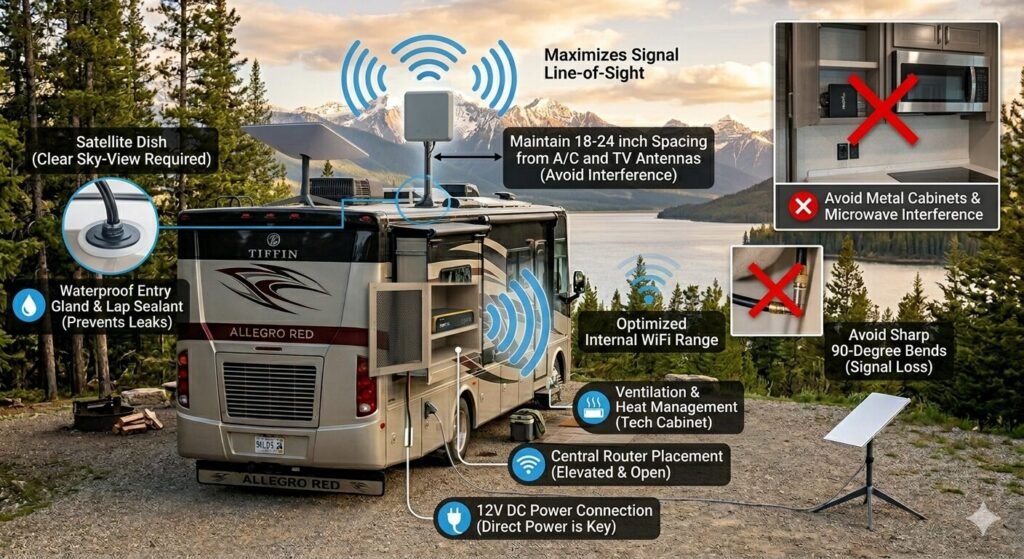
Where you install your internet gear inside the RV matters as much as the hardware itself. Even the most expensive router will struggle to deliver a strong signal if it is buried in a metal cabinet or placed near sources of interference. A professional installation focuses on three key areas: power access, heat management, and signal “line-of-sight.”
Many modern travelers utilize a “tech cabinet” approach. This is a dedicated, centralized space where the router and power supplies are permanently mounted. This location must have access to both AC and DC power, as many high-end mobile routers run more efficiently directly off your 12V house batteries.
Ventilation is a frequently overlooked factor in hardware placement. High-speed 5G routers and satellite power supplies generate significant heat during heavy data use. If you tuck your gear into a small, unvented cupboard, the hardware may “thermal throttle,” intentionally slowing down your speeds to protect its internal circuits from melting.
Roof Antenna Placement and Spacing
For cellular and WiFi signals, height is your best friend. Mounting your antennas on the roof allows them to “see” over neighboring RVs and obstacles that would otherwise block the signal at ground level. For the best results, antennas should be mounted as close to the center of the roof as possible.
Interference is a major concern when you have multiple systems on one roof. It is best practice to keep your cellular antennas at least 18 to 24 inches away from other electronics, such as air conditioning units or existing TV antennas. This spacing prevents “signal bleed” that can degrade your overall connection quality.
If you are using a 4×4 MIMO antenna, the orientation of the mounting is critical. These antennas use multiple internal elements to grab signals from different angles simultaneously. Ensuring a flat, unobstructed mount on the highest point of your rig will maximize the effectiveness of this multi-path technology.
Cable Management and Signal Loss
The cables connecting your roof antenna to your internal router are the “veins” of your system. A common mistake is using excessively long cables. Every foot of coaxial cable between the antenna and the router causes a small amount of “signal loss,” meaning the speed you get at the device will be lower than what is available on the roof.
To maintain maximum speed, keep your cable runs as short and direct as possible. Avoid sharp 90-degree bends, which can damage the delicate internal shielding of the wire. Instead, use a “gentle radius” when routing cables through cabinets or around corners to ensure the data flows without resistance.
Finally, the point where the cables enter the RV must be perfectly sealed. Using high-quality entry glands and lap sealant is mandatory to prevent water ingress. A small leak can go unnoticed for months, leading to hidden mold or structural damage behind your interior walls.
Optimizing Internal WiFi Range
Once the signal is inside the RV, your router must distribute it to your devices. The ideal location for a router is an elevated, open spot in the main living area. Placing the router on the floor or behind a microwave will significantly shorten the range of your internal WiFi signal.
Mirrors, metal backsplashes, and large appliances are all “WiFi killers.” These dense materials reflect or absorb the signal, creating “dead zones” in the bedroom or outside under the awning. If your RV is particularly large, you may need to consider a “mesh” system to extend the signal to both ends of the coach.
Conclusion: Building a Future-Proof Connection
Investing in a robust internet system is about more than just convenience. It is about the freedom to stay on the road longer without feeling disconnected from your life or work. By combining a reliable satellite source for remote areas with a high-gain cellular system for urban centers, you create a network as dependable as any home-based fiber connection.
Building a “future-proof” setup in the current landscape means prioritizing flexibility over any single piece of hardware. Technology moves fast, but a well-designed system with a centralized mobile gateway allows you to swap out components as new standards emerge. This modular approach ensures your rig stays at the cutting edge without requiring a total system overhaul every few years.
True reliability comes from redundancy and proactive management. Even the most advanced satellite constellation or 5G network can face local congestion or physical obstructions. Having a “failover” plan—where your system automatically pivots to a secondary source—is the only way to guarantee 100% uptime for those who cannot afford to be offline.
Hardware is only half the battle; your data plans are the other half. As carriers evolve their priority tiers and usage limits, staying informed about your “Fair Usage Policy” becomes a vital part of your travel planning. A future-proof RVer doesn’t just buy a dish or a hotspot; they manage a data portfolio that adapts to the geography of their journey.
Maintaining this equipment is simple but necessary for long-term success. Regularly checking your roof-mounted antennas for secure seals and ensuring your router’s software is kept up to date will prevent most technical issues before they start. Protecting your cables from UV damage and moisture is a small task that saves you from a massive headache in the middle of a remote trip.
When your connectivity is handled correctly, it disappears into the background of your RV life. It becomes a silent, reliable tool that empowers your adventures rather than a source of stress. This allows you to focus on the views outside your window and the experiences on your itinerary, knowing that the world is only a click away whenever you need it.
Read about all the systems that are in your RV